Showing posts with label Security. Show all posts

Windows-XP Password Cracking

4:08 PM 1 Comment
Here we use the tool "Cain and Abel" for cracking passwords of any local user/administrator.

Make sure that you have disabled the antivirus/firewall running on your system before installing and throughout this process.

Two most effective techniques used here are "Brute-Force" and "Cryptanalysis".


Brute-Force:- As this techniques takes more time to complete, the attacker prefer this technique only when there is a hope that the password contain same type of characters or may be two. i.e only loweralpha, only alpha, only numeric or may be loweralpha-numeric, also it should contain less than 7 characters. Otherwise it takes more time to crack password, which may be the mixture of all types of characters along with special symbols.
The step-by-step explaination for this technique is given below-

1) Open the tool "Cain and Abel"

 
2) Go into the category "Cracker" it displays all sub-categories under "Cracker" in left panel.

 
3) Select "LM & NTLM Hashes" from left panel and then click on + symbol, you will be greeted by a window as shown.

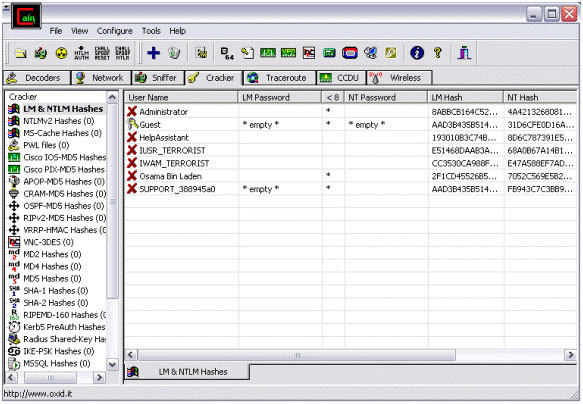
4) Check "import hashes from local system" and then click "Next". This shows all the active accounts on local system like administrator, guest, etc. along with LM and NT hashed values of their respective passwords, as shown below.

  4) Check "import hashes from local system" and then click "Next". This shows all the active accounts on local system like administrator, guest, etc. along with LM and NT hashed values of their respective passwords, as shown below.


5) Right clicking on any username shows all available options using which we can crack it's password
 
5) Right clicking on any username shows all available options using which we can crack it's password


6) Here we select "Brute-Force Attack" and then "NTLM Hashes", since windows uses NTLM hashes to store local users' passwords.

7) You will be greeted by a window where you can modify properties for brute-force attack such as password length, character set, etc.


8) Click on "Start" button.
9) On completion it will reveal the exact password.


Cryptanalisys:- Basically, Cryptanalisys means Operations performed in converting encrypted messages to plain text without initial knowledge of the crypto-algorithm and/or key employed in the encryption.
This is the fastest technique of password cracking possible due to "Rainbow Tables".
A rainbow table is a file that is used to lookup an unknown plaintext from a known hash for an algorithm that does not usually permit this operation.
Steps 1 to 4 i.e upto importing hashes from local system, are similar to previous technique (i.e brute-force). The steps coming after that are as follows-

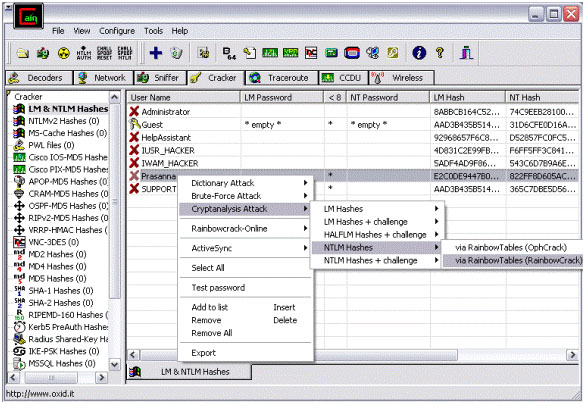
5) Here, select "cryptanalisys attack" then "NTLM hashes" and then select "via rainbow tables". Here we can choose either OphCrack or RainbowCrack formats of tables. The rainbow tables are available free to download on internet.


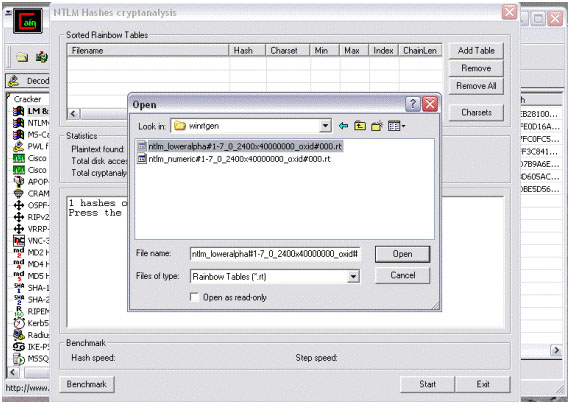
  6) Click on "Add Table"


7) Browse for the location of rainbow table on your system, select proper table and click "open".


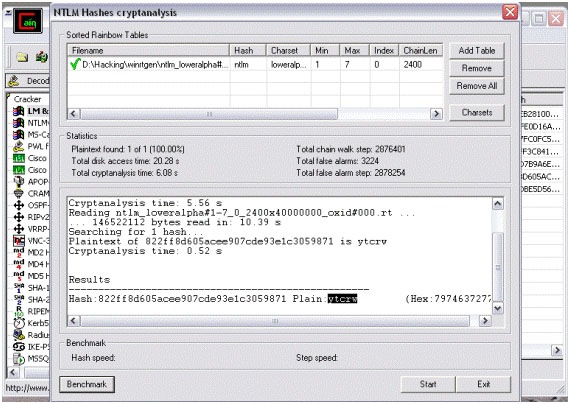
8) Select the loaded table and then click on "Start" button.


9) On completetion it will show the exact password.


To learn windows password cracking techniques properly, one must understand "LM" & "NTLM" algorithms, SAM File, Dumping NTLM hashes from local SAM, Rainbow Tables, etc.......!

Details of 100 million Facebook users published online

Undefined Soul 5:26 PM Add Comment

The personal details of 100 million Facebook users have been collected and published online in a downloadable file, meaning they will now be unable to make their publicly available information private.
However, Facebook downplayed the issue, saying that no private data had been compromised.
The information was posted by Ron Bowes, an online security consultant, on the Internet site Pirate Bay to highlight privacy issues, the BBC reported.
Bowes used code to scan the 500 million Facebook profiles for information not hidden by privacy settings. The resulting file, which allows people to perform searches of various different types, has been downloaded by more than 2,400 people.
This means that if any of those on the list decide to change their privacy settings on Facebook, Bowes and those who have the file will still be able to access information that was public when it was compiled.
Bowes’ actions also mean people who had set their privacy settings so their names did not appear in Facebook’s search system can now be found if they were friends with anyone who allowed their name to appear in searches.
'Scary privacy issue'
On his website, www.skullsecurity.org, Bowes said the results of his code were "spectacular," giving him 171 million names of which were 100 million unique.


"As I thought ... about it and talked to other people, I realized that this is a scary privacy issue. I can find the name of pretty much every person on Facebook," he wrote.
"Facebook helpfully informs you that "[a]nyone can opt out of appearing here by changing their Search privacy settings" — but that doesn't help much anymore considering I already have them all (and you will too, when you download the torrent). Suckers!"
"Once I have the name and URL of a user, I can view, by default, their picture, friends, information about them, and some other details," Bowes added. "If the user has set their privacy higher, at the very least I can view their name and picture. So, if any searchable user has friends that are non-searchable, those friends just opted into being searched, like it or not! Oops :)"
He said he discovered the top first name in the list was Michael, followed by John, David, Chris and Mike. The top surnames were Smith, Johnson, Jones, Williams and Brown.
A privacy expert expressed concern there may be more serious applications. Simon Davies, of campaign group Privacy International, told the BBC that some Facebook users "did not understand the privacy settings and this is the result."
"Facebook should have anticipated this attack and put measures in place to prevent it," he told the BBC. "It is inconceivable that a firm with hundreds of engineers couldn't have imagined a trawl of this magnitude and there's an argument to be heard that Facebook have acted with negligence."
'A little terrifying'
Some users of Pirate Bay shared his concerns.

"This is awesome and a little terrifying," lusifer69 wrote on the site. And another, Porkster, said: "I don't think this is a hack, but a collection from public domain info that people have shared. The importance of the info is structuring it and allowing someone to search or compute the data."
However, jak322 said: "I've got to say, who cares. All the info here is already in the public domain, is not sensitive and as a developer I already have access to what could be deemed personal and private data through the Facebook API."
In a statement emailed to msnbc.com, Facebook agreed, saying the information on the list was already available online.
"People who use Facebook own their information and have the right to share only what they want, with whom they want, and when they want," it said.
"Our responsibility is to respect their wishes. In this case, information that people have agreed to make public was collected by a single researcher. This information already exists in Google, Bing, other search engines, as well as on Facebook," the statement added.
"No private data is available or has been compromised. Similar to a phone book, this is the information available to enable people to find each other, which is the reason people join Facebook. If someone does not want to be found, we also offer a number of controls to enable people not to appear in search on Facebook, in search engines, or share any information with applications."

Source: MSNBC 


Here is the Download Link for that Torrent

http://thepiratebay.org/torrent/5722635/Facebook_directory_-_personal_details_for_100_million_users
Keep your Computer Safe Disable CD/DVD or USB Autorun in Windows

Keep your Computer Safe Disable CD/DVD or USB Autorun in Windows

Undefined Soul 7:21 PM Add Comment
When ever you plug a usb device to the system or insert a cd/dvd disk, The windows Autorun Run utility runs and displays certain options like Open files to view, Play, Do nothing etc.

Disable Cd Usb autorun in windows xp for security purpose 

Although this a good utility provided by windows xp operating system, It is sometimes very dangerous too. When A virus infected Usb drive or Cd is plugged into the system, the virus gets a chance to attack you Operating system, by running automatically when you plug your device in. So, for this safety purpose, we need to Disable this Autorun feature in windows XP.
Follow the below steps and ensure your systems safety.

1) Click Start –> Run and type  GPEDIT.MSC  –  This opens Group Policy editor window.
2) On the left side –> expand  Computer Configuration–> Administrative Templates–> System.
3)  Locate the entry for Turn autoplay off on the right side.
4) Double click it and select “Enabled”
For any further assistance to Disable Cd Autorun view the sample screen shot below.

Disable turnoff windows cd Autorun
Delete Autorun.inf virus manually with Win RAR

Delete Autorun.inf virus manually with Win RAR

Undefined Soul 7:13 PM 1 Comment
Once my computer was infected with this autorun.inf virus. This virus corrupted almost all the drives on the Hard disk, and when ever i tried to double click on the drive or opening  any drive it opened in a new window. In some cases, when your drive is infected with this Autorun.inf virus, you won’t be able to access the drive completely. You have to browse the drive by Exploring it i.e; Ctrl+E keys from the keyboard.

Remove autorun.inf virus from windows


Sometimes ever you will not be able to see hidden files even if you have Show hidden files Enabled under Folder Options. well, this are all the wonders of this Autorun.inf virus.

I am going to show you this rare method of removing Autorun.inf manually using just winrar application, not any antivirus or malware programs.

Solution to Remove Autorun.inf Virus

Step 1: First Disable CD/DVD or USB Autorun in windows

Step 2: Open Winrar.exe  (Start–>All Programs–>WinRar–>WinRar.exe)

Step 3: Now Browse to any drive that is infected with Autorun.inf virus using winrar explorer.

Step4: Here you will see all the hidden files under winrar for that particular drive.

Step 5: Look for the file Autorun.inf and open it using notepad.

Step 6: In that Autorun file, some .EXE file will be mentioned that will be executed along with the autorun file. This exe file is the main culprit.

Delete Autorun.exe virus file

Step 7: Note the exe file mentioned in the Autorun.inf file. Close this Autorun.inf file.

Step 8: Now look for that .Exe file in the drive (Ex: c:/), Delete that .exe file along with Autorun.inf

Step 9: Restart your Operating System. Now your system is free with Autorun.inf Virus.

Note: Repeat the same process if your Usb or Pendrives are infected with Autorun.inf virus.
If you know anyother method to remove autorun virus from windows operating system, them kindly let me know by posting your method using the Comments on this post.
Phishing - The art of Phishing | How Phishing Works | Phishing Attacks

Phishing - The art of Phishing | How Phishing Works | Phishing Attacks

Undefined Soul 6:50 AM Add Comment


Phishing is an attempt to criminally and fraudulently acquire sensitive information, such as usernames, passwords and credit card details, by appearing as a trustworthy entity in an electronic communication. eBay, PayPal and other online banks are common targets. Phishing is typically carried out by email or instant messaging and often directs users to enter details at a website, although phone contact has also been used. Phishing is an example of social engineering techniques used to fool users. Attempts to deal with the growing number of reported phishing incidents include legislation, user training, public awareness, and technical measures.
Recent phishing attempts have targeted the customers of banks and online payment services. Social networking sites such as Orkut are also a target of phishing.
Spoofed/Fraudulent e-mails are the most widely used tools to carry out the phishing attack. In most cases we get a fake e-mail that appears to have come from a Trusted Website . Here the hacker may request us to verify username & password by replaying to a given email address.
TECHNIQUES BEHIND PHISHING ATTACK
1. Link Manipulation
Most methods of phishing use some form of technical deception designed to make a link in an email appear to belong to some trusted organization or spoofed organization. Misspelled URLs or the use of subdomains are common tricks used by phishers, such as this example URL
2. Filter Evasion
Phishers have used images instead of text to make it harder for anti-phishing filters to detect text commonly used in phishing emails. This is the reason Gmail or Yahoo will disable the images by default for incoming mails.
How does a phishing attack/scam look like?
As scam artists become more sophisticated, so do their phishing e-mail messages and pop-up windows. They often include official-looking logos from real organizations and other identifying information taken directly from legitimate Web sites. Here is an example of how the phishing scam email looks like
Example of a phishing e-mail message, including a deceptive URL address linking to a scam Web site.
To make these phishing e-mail messages look even more legitimate, the scam artists may place a link in them that appears to go to the legitimate Web site (1), but it actually takes you to a phishing site (2) or possibly a pop-up window that looks exactly like the official site.
These copycat sites are also called “spoofed” Web sites. Once you’re at one of these spoofed sites, you may send personal information to the hackers.
How to identify a fraudulent e-mail?
Here are a few phrases to look for if you think an e-mail message is a phishing scam.
“Verify your account.”
Legitimate sites will never ask you to send passwords, login names, Social Security numbers, or any other personal information through e-mail.
“If you don’t respond within 48 hours, your account will be closed.”
These messages convey a sense of urgency so that you’ll respond immediately without thinking.
“Dear Valued Customer.”
Phishing e-mail messages are usually sent out in bulk andoften do not contain your first or last name.
“Click the link below to gain access to your account.”
HTML-formatted messages can contain links or forms that you can fill out just as you’d fill out a form on a Web site. The links that you are urged to click may contain all or part of a real company’s name and are usually “masked,” meaning that the link you see does not take you to that address but somewhere different, usually a scam Web site.
Notice in the following example that resting the mouse pointer on the link reveals the real Web address, as shown in the box with the yellow background. The string of cryptic numbers looks nothing like the company’s Web address, which is a suspicious sign.
So the Bottom line to defend from phishing attack is
1. Never assume that an email is valid based on the sender’s email address.
2. A trusted bank/organization such as paypal will never ask you for your full name and password in a PayPal email.
3. An email from trusted organization will never contain attachments or software.
4. Clicking on a link in an email is the most insecure way to get to your account.

Spam email watch- How to protect yourself from spam emails

Undefined Soul 5:20 AM 1 Comment
What is a spam (junk mail) offer?

Spam is an unsolicited (or junk) email. Spam emails usually offer free goods or ‘prizes’, very cheap products (including pharmaceuticals), promises of wealth or other offers that could result in you taking part in a scam. You might be asked to pay a joining fee, to buy something to 'win' a prize or some other benefit, or to call a 190 telephone or fax number (calls made to these numbers are charged at premium rates). Spam emails can basically offer you anything and everything—from fake college degrees to pirated software and counterfeit designer watches—so it pays to be suspicious and delete unsolicited emails.

Spam emails differ from regular printed junk mail in one major way—responding to a scam email can cause you many problems. You may find that malicious software like spyware or key-loggers has been downloaded onto your computer. Your credit card or other personal details may be stolen. You may send away money for something that never arrives or is not what you thought it would be.


Warning signs
You receive an unsolicited email that contains:

    * an invitation to participate in any type of lottery or sweepstake
    * an offer of uninvited gifts or goods from any source
    * an offer from overseas
    * a request to pay a fee to receive more 'benefits' from the same provider
    * an offer from an unregistered lottery
    * an offer of special benefits (eg, wealth, love, health) from someone claiming psychic powers
    * an offer of a gambling system that guarantees winners.


Protect yourself against spam (junk mail) offers

    * Do not open suspicious or unsolicited emails (spam): delete them.
    * Do not click on any links in a spam email, or open any files attached to them.
    * Never call a telephone number that you see in a spam email.
    * NEVER reply to a spam email (even to unsubscribe).
    * Never enter your personal, credit card or online account information on a website that you are not certain is genuine.
    * Never send your personal, credit card or online account details through an email.
    * Use your common sense: the offer may be a scam.
    * Read all the terms and conditions of any offer very carefully: claims of free or very cheap offers often have hidden costs.
    * Do not send any money or pay any fee to claim a prize or lottery winnings.


Do your homework

Remember that letters, emails and other approaches offering you something that looks too good to be true are almost always scams.

If you are interested in what the email is offering, contact your local office of fair trading to see if they can tell you more about the offer.

If you are interested in an offer, use a search engine to locate the firm’s website address. Be sure that you know what the offer is actually for, what the total cost will be and what to do if something goes wrong (e.g. the product is not delivered or does not work).

Seek independent advice from an accountant or solicitor if a significant amount of money is involved. Don’t provide your credit card or bank account details to ANYBODY you are not completely sure about.


Decide
If you receive a spam offer, the best thing to do is delete the email. Do NOT respond. Do not email back, do not call any telephone number listed in the email and do not send any money, credit card details or other personal details to the scammers. Responding only indicates you're interested and you could end up with lots more fake offers in the future.

If you are interested in what the spam email is offering, it is still best not to follow any link contained in the email. Internet links do not always lead where their name says they do. Sometimes, clicking on a link will download a program to your computer. Make sure you have done your homework before doing anything to take up an offer from a spam email.

Source:- http://www.scamwatch.gov.au/
There is a website dedicated to spam. You can read lots more. 
Visit
http://www.scamwatch.gov.au/content/index.phtml/itemId/693900